
U4GO: Open USB 4G
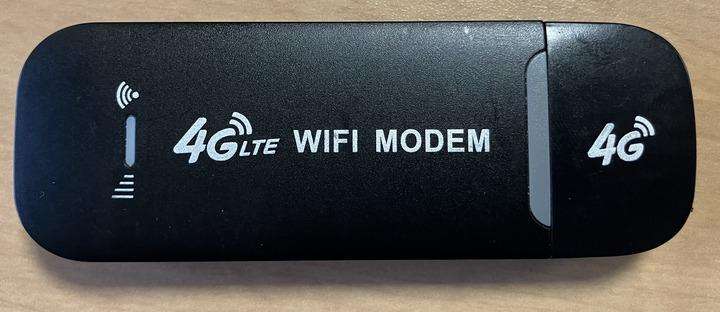
At first glance, those inexpensive 4G/LTE USB “WiFi modem sticks” you find on marketplaces like AliExpress or Amazon look like simple mobile hotspots—plug them in, insert a SIM card, and get online. But behind their plastic shells lies something far more interesting: many of these devices are actually tiny smartphones without screens, powered by a surprisingly capable Qualcomm Snapdragon 410 (MSM8916) system‑on‑chip:
- Quad‑core Qualcomm MSM8916 CPU (ARM Cortex‑A53 @ ~1GHz)
- 512MB RAM & 4GB eMMC (varies by model)
- Built‑in 4G LTE modem
- WiFi hotspot capability
- UART header, LEDs, and occasionally microSD slot on some model
Originally shipped as compact mobile routers, these sticks typically run a stripped‑down Android‑based firmware, presenting themselves as WiFi hotspots while doing all the heavy lifting under the hood. When you plug one into a computer, it even identifies itself as an Android device
What makes them truly interesting is that their bootloaders are unlocked, allowing users to flash custom firmware.It became possible to install Linux, such as Debian, turning a $12–$20 modem stick into a Linux capable device.
The OpenStick Project is a community‑driven effort to re-purpose these little devices into fully functional Linux‑capable Single Board Computers (SBCs).
Not all 4G sticks are suitable, they must use the MSM8916 chipset and often have SSID “SSID 4G‑UFI‑XX” on the case. So, it is a hit‑or‑miss buying these devices.
I've got two models from Aliexpress that i found work well with openstick
- UFI003
- UZ801v3
After spending some time experimenting with the OpenStick Debian image on these MSM8916‑based 4G USB sticks, I quickly realized both the potential of the hardware and the limitations of the existing approach. Debian works, but it is not particularly optimized for such small, constrained devices. The system includes far more userspace components than necessary, and maintaining customizations across updates can become cumbersome.
That’s what motivated me to create a dedicated Yocto layer for these devices—allowing full control over the system, minimal footprints, and a clean, reproducible embedded‑Linux environment tailored specifically for these 4G sticks.
What is Open USB 4G (U4GO) ?
U4GO is a lightweight embedded Linux distribution based on the Yocto Poky and is built/generated from my dedicated Yocto layer, meta-u4go-distrib. It is specifically tailored for USB 4G/LTE modem sticks based on the Qualcomm MSM8916 platform, and it has been tested on the two devices currently in my collection. The goal of U4GO is to provide a clean, efficient, and maintainable Linux environment optimized for these compact mobile‑router‑style devices.
Why Use Yocto for These Devices?
Creating a custom Yocto layer for MSM8916‑based sticks offers several strong advantages. Yocto provides a structured and professional embedded‑Linux workflow, making it ideal for hardware that requires precise control over the system stack.
A Yocto layer is especially suitable for these devices because it enables:
Clean hardware abstraction (BSP model)
Yocto’s Board Support Package structure makes it easy to encapsulate all MSM8916‑specific logic—kernel configuration, device trees, drivers, and bootloader adjustments—into well‑organized layers.
Maintainable kernel and bootloader customization
Kernel patches, configuration fragments, and bootloader tweaks can be neatly implemented using .bbappend recipes, ensuring long‑term maintainability.
Fully reproducible, automated builds
Every aspect of the system is defined in the build metadata, allowing you to regenerate the same image consistently across versions and development environments.
Streamlined patch management and updates
Changes are layered, traceable, and do not pollute upstream recipes, making system evolution far easier.
Minimal, application‑focused Linux images
Because Yocto only includes what you explicitly request, the resulting images are extremely small—ideal for constrained hardware like USB 4G sticks.
Excellent for long‑term and production use
The combination of reproducibility, modularity, and customization makes Yocto a natural fit for devices that need a lean, predictable OS image.
What U4GO Provides
The U4GO Linux image generated from meta-u4go-distrib offers a focused, bloat‑free runtime environment designed to operate the modem stick efficiently while leaving room for custom applications.
Kernel & Core System
- Mainline Linux kernel 6.12 LTS
- Core system only — no unnecessary services or tools
- No package manager, ensuring immutability and minimal attack surface
u4go:~$ uname -a
Linux u4go 6.12.1 #1 SMP PREEMPT Sat Nov 23 17:57:48 UTC 2024 aarch64 GNU/Linux

u4go:~$ cat /etc/os-release
ID=poky
NAME="Poky (Yocto Project Reference Distro)"
VERSION="5.0.14 (scarthgap)"
VERSION_ID=5.0.14
VERSION_CODENAME="scarthgap"
PRETTY_NAME="Poky (Yocto Project Reference Distro) 5.0.14 (scarthgap)"
CPE_NAME="cpe:/o:openembedded:poky:5.0.14"
Essential Included Components
(Non‑exhaustive list)
- systemd — service and boot management
- Dropbear — lightweight SSH server
- NetworkManager with
nmcliandnmtui - ModemManager with
mmcli— essential for LTE control - Android tools ADBD for ADB interface support
- USB gadget framework with RNDIS support
- ...
These components make the device fully operational as a network‑capable embedded unit while keeping the footprint as small as possible.
The following prebuild images are available:
Cross‑Compiling with the U4GO SDK
The Yocto layer can also generate a standalone Software Development Kit (SDK).
This SDK allows you to easily cross‑compile additional applications for the MSM8916‑based sticks without re‑building the entire system image—perfect for developing custom services, CLI tools, or automation scripts targeted at U4GO.
The prebuild SDK is available here.
Flash and use U4GO on device
Prerequisites
Before booting U4GO, the device must first be prepared by flashing the OpenStick bootloader through the ADB interface. Below is the recommended procedure.
To activate ADB, insert the stick and allow it to fully boot up. Then establish a WiFi connection with the stick using the credentials specified on its back. After successfully logging in, launch a webbrowser and navigate to the stick’s management page at http://192.168.100.1. Log in with the username/password combination “admin.”
Once logged in, visit http://192.168.100.1/usbdebug.html to enable ADB. Reboot the stick (by reinserting the stick into the PC) and verify that ADB is active post-reboot.
adb devices
List of devices attached
0123456789ABCDEF	device
(Optional but Recommended) Backup the Device
Boot to EDL
adb reboot edl
Next, retrieve the EDL tool from Bjoern Kerler’s GitHub page: https://github.com/bkerler/edl.git and follow the provided instructions to install the necessary dependencies. Once installed, proceed to generate various backups.
python3 edl.py rf usb4g-stock.bin
python3 edl.py rl usb4g_stock --genxml
Keep that backup files safe, in case you want to restore the stock image.
Flash the OpenStick Bootloader
Download and extract the base-generic.zip from https://github.com/OpenStick/OpenStick/releases/download/v1/base-generic.zip, and run the base/flash.sh script to flash the openstick bootloader to the device.
Flash the U4GO Image
Download prebuild images based on model:
Enter fastboot
adb reboot bootloaderFlash boot image (ramdisk + kernel + device tree)
fastboot flash boot boot-ufi003.img
# or for uz801v3 model
fastboot flash boot boot-uz801.img
Flash rootfs image
fastboot -S 200M flash rootfs rootfs-ufi003.img
# or for uZ801v3 model
fastboot -S 200M flash rootfs rootfs-uz801.img
Reboot:
fastboot rebootConnect to the device
The default username/password for U4GO is:
u4go / pokySimply plug the device into a USB port.
U4GO has ADBD enabled by default, which means the system behaves like an Android device and can be accessed using the standard ADB/Fastboot tools.
In addition, the USB interface is configured as an RNDIS network device, effectively turning the stick into a small Ethernet interface. In this mode, it behaves like a classic 4G dongle:
- It provides an IP address to the host computer,
- It routes traffic to the 4G/LTE network.
Network configuration defaults are:
Device IP (usb0):       192.168.68.1
DHCP listen address:    192.168.68.1
DHCP range:             192.168.68.10 – 192.168.68.254 (12h lease)
sh-5.2# ip a
1: lo: <LOOPBACK,UP,LOWER_UP> mtu 65536 qdisc noqueue qlen 1000
link/loopback 00:00:00:00:00:00 brd 00:00:00:00:00:00
inet 127.0.0.1/8 scope host lo
valid_lft forever preferred_lft forever
inet6 ::1/128 scope host noprefixroute
valid_lft forever preferred_lft forever
2: wlan0: <NO-CARRIER,BROADCAST,MULTICAST,UP> mtu 1500 qdisc noqueue qlen 1000
link/ether ae:09:ed:18:7e:ef brd ff:ff:ff:ff:ff:ff
3: wwan0: <POINTOPOINT,NOARP> mtu 1500 qdisc noop qlen 1000
link/[519]
4: wwan1: <POINTOPOINT,NOARP> mtu 1500 qdisc noop qlen 1000
link/[519]
5: wwan2: <POINTOPOINT,NOARP> mtu 1500 qdisc noop qlen 1000
link/[519]
6: wwan3: <POINTOPOINT,NOARP> mtu 1500 qdisc noop qlen 1000
link/[519]
7: wwan4: <POINTOPOINT,NOARP> mtu 1500 qdisc noop qlen 1000
link/[519]
8: wwan5: <POINTOPOINT,NOARP> mtu 1500 qdisc noop qlen 1000
link/[519]
9: wwan6: <POINTOPOINT,NOARP> mtu 1500 qdisc noop qlen 1000
link/[519]
10: wwan7: <POINTOPOINT,NOARP> mtu 1500 qdisc noop qlen 1000
link/[519]
11: usb0: <BROADCAST,MULTICAST,UP,LOWER_UP> mtu 1500 qdisc pfifo_fast qlen 1000
link/ether 44:61:64:55:53:42 brd ff:ff:ff:ff:ff:ff
inet 192.168.68.1/16 brd 192.168.255.255 scope global noprefixroute usb0
valid_lft forever preferred_lft forever
inet6 fe80::b0a0:30b4:72c5:d19c/64 scope link noprefixroute
valid_lft forever preferred_lft foreverYou can connect to the device over the RNDIS interface via SSH:
ssh u4go@192.168.68.1Managing Connectivity from the Shell
Once logged in:
- Use nmcli or nmtui to:
- Configure WiFi hotspot mode
- Connect to an existing WiFi network
- Use mmcli to:
- Inspect, configure, and control the LTE/4G modem
- Manage connection states and profiles
Build U4GO from yocto layer
The meta‑u4go-distrib layer is designed for Yocto Scarthgap (5.0.15 LTS) and integrates seamlessly with a standard Yocto build environment.
Before starting, ensure your system is correctly configured for Yocto. You can refer to the official documentation for setup instructions:
https://docs.yoctoproject.org/5.0.15/
Clone the meta-u4go-distrib layer:
git clone https://git.iohub.dev/dany/meta-u4go-distrib.git
cd meta-u4go-distrib
git submodule update --init
Source the build environment
cd poky && source oe-init-build-env ../buildBuild image:
MACHINE=uz801 bitbake core-image-base
# or for UFI003
MACHINE=ufi003 bitbake core-image-base
If you need a cross‑compilation environment for building additional applications for your 4G stick, you can generate the SDK with:
bitbake core-image-base -c populate_sdk