
Building a Reliable Offline Backup System with udev and systemd
Every one who have a homelab and/or self-host NAS know that the 3‑2‑1 rule is a best‑practice backup strategy, widely used for such systems to protect data against hardware failure, human error, ransomware, and disasters: 3 copies of your data in at least 2 different types of media, and one copy off-site.
For my homelab, I use a ZFS RAIDZ1 storage pool composed of four 2 TB HDDs as the primary live data storage. This setup already provides a first layer of protection, including tolerance for a single disk failure, as well as ZFS features such as snapshots, which help protect against accidental deletion or data corruption.
To further improve data safety, the dataset is periodically backed up to a separate SSD using a weekly cron job. This secondary backup protects against logical failures affecting the main pool and allows for faster recovery of recent data.
Finally, to mitigate risks such as ransomware, catastrophic hardware failure, or site‑level incidents, an offline backup is performed manually on an 8 TB LaCie USB external hard drive. This drive remains disconnected when not in use, providing an additional layer of protection through air‑gapped storage.
Currently, the offline backup process requires manually executing the backup script each time the external hard drive is connected, which is not ideal and defeats the purpose of a streamlined backup strategy. This manual intervention introduces the risk of forgetting to run the backup and reduces overall reliability.
To address this limitation, I would like to fully automate the process. The goal is for the system to automatically detect when the specific external hard drive is plugged in and immediately trigger the backup workflow without user interaction. This ensures that backups are consistently executed as soon as the device becomes available.
Once the backup operation is completed, the system should send a notification indicating the backup status, including whether it succeeded or failed. This feedback mechanism provides confirmation that the offline backup was properly executed and allows for rapid response in case of errors.
This post shows how to automatically run a mount → rsync → unmount backup workflow when a LaCie (or Seagate‑bridged) USB drive is plugged in on my Debian 13 homelab, with email notifications . It’s also robust against unplug events: if the disk is removed during the backup, you’ll receive a failure email.
Design
To detect when the external hard drive is connected, we can rely on udev, the Linux device manager responsible for handling hardware events. In theory, udev could be configured to directly execute the backup script as soon as the correct drive is detected.
However, running long‑running or resource‑intensive tasks directly from udev is strongly discouraged. udev operates under strict timing, environment, and permission constraints, and heavy jobs can block device handling or fail unpredictably.
Instead, a more robust approach is to use udev solely as an event trigger. When the specific external drive is connected, udev can identify and tag the device, then notify systemd. Systemd is then responsible for launching a dedicated oneshot service that performs the backup operation in a controlled and reliable execution environment. This gives us:
- Stable environment and logging via systemd/journald
- Clean dependency on the device via
BindsTo=dev-%i.device - Reliable signal handling if the device is unplugged mid‑run
- Clear timeouts, resource limits, and hardening
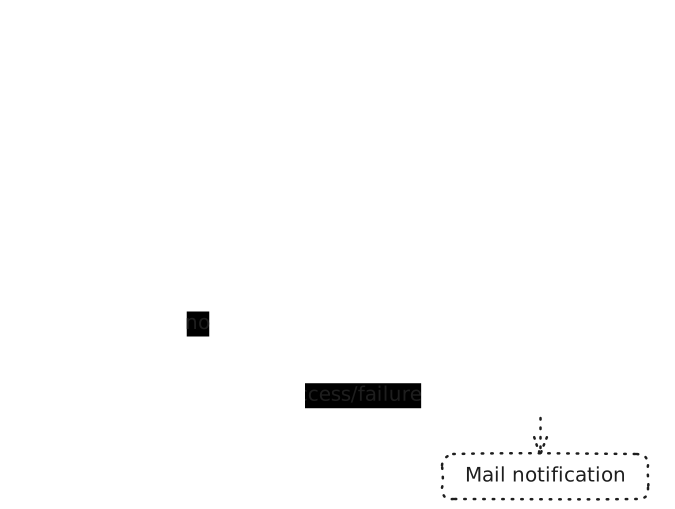
So our backup pipeline would be something like this:
Prerequisites
Install the standard tools:
sudo apt update
sudo apt install rsync util-linux coreutils findutils
# If you uses exFAT or NTFS on the backup media, also install:
sudo apt install exfatprogs ntfs-3g
(Recommended) Label the backup partition so udev can match it safely:
FAT32:
sudo dosfslabel /dev/sdX1 RECOVERYNTFS:
sudo ntfslabel /dev/sdX1 RECOVERYexFAT:
sudo exfatlabel /dev/sdX1 RECOVERYext4:
sudo e2label /dev/sdX1 RECOVERYudev rule to trigger on external drive plug‑in
To allow udev to reliably identify the correct backup media when it is connected, we first need to determine the USB device identifiers, such as the vendor ID and product ID. These identifiers uniquely distinguish the external hard drive from other USB storage devices and can later be used to create precise udev rules.
To obtain this information, plug the USB external hard drive into the system and inspect the kernel messages using the dmesg command. This command displays recent hardware events detected by the kernel, including details about newly attached USB devices.
usb 2-1: new SuperSpeed USB device number 4 using xhci_hcd
[ 2218.538911] usb 2-1: New USB device found, idVendor=059f, idProduct=1088, bcdDevice= 0.01
[ 2218.538923] usb 2-1: New USB device strings: Mfr=2, Product=3, SerialNumber=1
[ 2218.538928] usb 2-1: Product: Rugged Mini USB 3.0
[ 2218.538932] usb 2-1: Manufacturer: LaCie
[ 2218.538935] usb 2-1: SerialNumber: 0000NT146JJ3
[ 2218.575314] scsi host10: uas
[ 2218.576231] scsi 10:0:0:0: Direct-Access     LaCie    Rugged Mini USB3 153E PQ: 0 ANSI: 6
[ 2218.578164] sd 10:0:0:0: Attached scsi generic sg3 type 0
Note down the idVendor (e.g. 059f) and idProduct (e.g. 1088).
Create an udev rule to detect the drive /etc/udev/rules.d/99-nas-backup.rules:
# Start backup when a LaCie/Seagate USB partition labeled RECOVERY is added.
# LaCie vendor: 059f, Seagate (LaCie bridge): 0bc2

ACTION=="add", SUBSYSTEM=="block", KERNEL=="sd*[0-9]", \
  SUBSYSTEMS=="usb", ATTRS{idVendor}=="059f|0bc2", \
  ENV{ID_FS_LABEL}=="RECOVERY", \
  TAG+="systemd", ENV{SYSTEMD_WANTS}="nas-backup@%k.service"
sudo udevadm control --reload
sudo udevadm trigger --subsystem-match=block
This udev rule matches block devices added to the system (ACTION=="add", SUBSYSTEM=="block") whose kernel name corresponds to a partition (e.g. sda1, via KERNEL=="sd*[0-9]") and that originate from the USB subsystem. The rule further restricts the match to devices with specific USB vendor IDs (059f or 0bc2) and a filesystem label explicitly set to RECOVERY, ensuring that only the intended backup drive is recognized. When all conditions are met, the device is tagged for systemd integration, and udev requests the start of the corresponding systemd template service (nas-backup@%k.service defined below), passing the device name as an instance parameter.
Prefer matching by UUID? Replace the label condition with: ENV{ID_FS_UUID}=="<YOUR-UUID>".systemd template service
Create /etc/systemd/system/nas-backup@.service:
[Unit]
Description=NAS backup on device %I
Documentation=man:rsync(1)
# Tie this job's lifecycle to the device:
BindsTo=dev-%i.device
After=dev-%i.device local-fs.target

[Service]
Type=oneshot
EnvironmentFile=-/etc/default/nas-backup
ExecStart=/usr/local/sbin/nas-backup.sh %I
Nice=10
IOSchedulingClass=idle

# Security hardening (still allows mount + sendmail + reading source)
NoNewPrivileges=true
PrivateTmp=true
ProtectSystem=strict
ProtectHome=true
ReadWritePaths=/mnt /var/log /run
LockPersonality=true
RestrictRealtime=true
ProtectKernelTunables=true
ProtectKernelModules=true
ProtectControlGroups=true
RestrictAddressFamilies=AF_UNIX AF_INET AF_INET6

# Large backups may take time (3h here)
TimeoutStartSec=10800
sudo systemctl daemon-reloadThis file defines a systemd template service (e.g. nas-backup@.service) designed to:
- Be started per device (the
%Iinstance) - Automatically bind its lifecycle to a specific block device
- Run a one‑shot backup job when that device appears:
/usr/local/sbin/nas-backup.shwith environment variables defined in/etc/default/nas-backup - Execute safely with resource control and security hardening (optional)
- The unit uses systemd hardening directives while allowing necessary write paths (
/mnt,/var/log,/run). Adjust if your source root requires additional access.
Why this catches unplug: When the device disappears, dev-%i.device goes inactive; systemd sends SIGTERM to the running job. The script’s trap transforms that into a failure email and a best‑effort unmount (see the script below).
The backup script
This script assumes that sendmail is already configured and that the system is able to send emails from the command line. The configuration of sendmail itself is out of scope for this post.
Create /usr/local/sbin/nas-backup.sh. This script:
- Mounts the partition at
/mnt/backup/<LABEL or UUID> - Only run the backup process if no
/mnt/backup/<LABEL or UUID>/DISABLE-AUTO-BACKUPis available on the media (in case we want to restore data instead of backup). - Runs
rsyncfrom/srv/shared/poolto<mount>/backup - Sends start and success/failure emails using your existing
sendmail - Detects mid‑backup unplug and emails failure
- Safety: The script uses a lock to avoid overlapping runs and will best‑effort unmount on any exit.
- The script does not store credentials—email goes via your local
sendmail. - Store backup log in both system journal and a file, default to:
/var/log/nas-backup.log
#!/usr/bin/env bash
set -Eeuo pipefail
set -x
# nas-backup.sh
# Invoked by: systemd unit nas-backup@<dev>.service with %I = sdb1
# Flow: mount -> rsync /srv/shared/pool -> unmount -> email notifications
# Sends failure email on any error OR if the device is unplugged mid-run.

# ===== Config (overridable via /etc/default/nas-backup) =====
SRC_DIR="${SRC_DIR:-/srv/shared/pool}"
MNT_BASE="${MNT_BASE:-/mnt/backup}"
MAIL_FROM="${MAIL_FROM:-noreply@example.com}"
MAIL_TO="${MAIL_TO:-user@example.com}"
MAIL_SUBJECT_PREFIX="${MAIL_SUBJECT_PREFIX:-[NAS Backup]}"
BACKUP_SUBDIR="${BACKUP_SUBDIR:-backup}"
BACKUP_UID="${BACKUP_UID:-0}"        # for exfat/ntfs ownership mapping
BACKUP_GID="${BACKUP_GID:-0}"
RSYNC_EXTRA="${RSYNC_EXTRA:-}"       # e.g. "--exclude .cache/"
LOG_FILE="${LOG_FILE:-/var/log/nas-backup.log}"
SENDMAIL_BIN="${SENDMAIL_BIN:-/usr/sbin/sendmail}"
# =============================================================

log() {
  local msg="$1"
  logger -t nas-backup "$msg"
  mkdir -p "$(dirname "$LOG_FILE")"
  echo "[$(date -Is)] $msg" >> "$LOG_FILE"
  LAST_MSG="$msg"
}

is_mounted() { mountpoint -q "$1"; }

mount_fs() {
  mkdir -p "$MNT_POINT"
  local opts="noatime"
  case "$FSTYPE" in
    ext2|ext3|ext4|xfs|btrfs)
      mount -t "$FSTYPE" -o "$opts" "/dev/${KDEV}" "$MNT_POINT"
      ;;
    exfat|ntfs|vfat)
      opts="${opts},uid=${BACKUP_UID},gid=${BACKUP_GID}"
      mount -t "$FSTYPE" -o "$opts" "/dev/${KDEV}" "$MNT_POINT"
      ;;
    *)
      log "Unsupported/unknown filesystem '$FSTYPE' on /dev/${KDEV}"
      exit 1
      ;;
  esac
}

umount_fs() {
  if is_mounted "$MNT_POINT"; then
    sync || true
    umount "$MNT_POINT" || { log "Warning: unmount failed for $MNT_POINT"; return 1; }
  fi
}

send_mail() {
  local subject="$1"; shift
  local body="$*"
  {
    echo "From: ${MAIL_FROM}"
    echo "To: ${MAIL_TO}"
    echo "Subject: ${MAIL_SUBJECT_PREFIX} ${subject}"
    echo "Content-Type: text/plain; charset=UTF-8"
    echo
    echo -e "${body}"
  } | "$SENDMAIL_BIN" -t
}


KDEV="${1:-}"   # e.g., sdb1
if [[ -z "$KDEV" ]]; then
  echo "Usage: $0 <kernel-device> (e.g., sdb1)" >&2
  exit 2
fi

# Ensure sendmail exists
if [[ ! -x "$SENDMAIL_BIN" ]]; then
  log "Error: sendmail binary not found at $SENDMAIL_BIN"
  exit 3
fi

# Lock to avoid concurrent runs
mkdir -p /run
exec 9>/run/nas-backup.lock
if ! flock -n 9; then
  log nas-backup "Another backup is already running; exiting."
  exit 0
fi

STATUS="started"   # will become "success" on completion
LAST_MSG=""


# Read filesystem metadata
readarray -t BLKINFO < <(blkid -o export "/dev/${KDEV}" || true)
declare -A META=()
for line in "${BLKINFO[@]}"; do
  [[ "$line" == *=* ]] || continue
  META["${line%%=*}"]="${line#*=}"
done
FSTYPE="${META[TYPE]:-unknown}"
UUID="${META[UUID]:-}"
LABEL="${META[LABEL]:-}"
MNT_NAME="${LABEL:-${UUID:-$KDEV}}"
MNT_POINT="${MNT_BASE}/${MNT_NAME}"

# On any exit that isn't success, send failure email (covers signals/unplug)
on_exit() {
  local code=$?
  if [[ "$STATUS" != "success" ]] ; then
    send_mail "FAILED on ${KDEV}" \
"Backup FAILED (exit=${code}).\n\nDevice: /dev/${KDEV}\nMount:  ${MNT_POINT}\nFS:     ${FSTYPE}  LABEL='${LABEL}'  UUID='${UUID}'\nLast:   ${LAST_MSG}\n\nThis can happen if the disk was unplugged or an I/O error occurred.\nCheck: journalctl -u 'nas-backup@${KDEV}.service' and ${LOG_FILE}."
  fi
  # Try to unmount if still mounted
  umount_fs || true
}
trap on_exit EXIT

# Also mark failure explicitly on common signals so EXIT trap knows
on_signal() { STATUS="failed"; exit 1; }
trap on_signal TERM INT HUP

# Decide rsync flags based on FS
rsync_flags_common=(-a --delete --numeric-ids --info=stats1,progress2 --human-readable)
if [[ "$FSTYPE" =~ ^(ext2|ext3|ext4|xfs|btrfs)$ ]]; then
  rsync_flags=("${rsync_flags_common[@]}" -A -X -H)
else
  rsync_flags=("${rsync_flags_common[@]}" -H)
fi
# Optional extras
if [[ -n "${RSYNC_EXTRA}" ]]; then
  # shellcheck disable=SC2206
  rsync_flags+=(${RSYNC_EXTRA})
fi

# Mount
mount_fs
log "Mounted /dev/${KDEV} at ${MNT_POINT}"

if [ -e "${MNT_POINT}/DISABLE-AUTO-BACKUP" ]; then
  log "Auto backup is disabled (file exists: DISABLE-AUTO-BACKUP)"
  umount_fs || true
  STATUS="success"
  exit 0
fi
# Start + notify
log "Starting backup for /dev/${KDEV} (FS=${FSTYPE}, LABEL='${LABEL}', UUID='${UUID}') -> ${MNT_POINT}"
send_mail "Started on ${KDEV}" \
"Backup started.\n\nSource: ${SRC_DIR}\nTarget: ${MNT_POINT}/${BACKUP_SUBDIR}\nDevice: /dev/${KDEV}\nFS:     ${FSTYPE}  LABEL='${LABEL}'  UUID='${UUID}'"

# Ensure target directory exists
TARGET="${MNT_POINT}/${BACKUP_SUBDIR}"
mkdir -p "$TARGET"

# Run rsync (capture exit code even with tee)
log "Running rsync from ${SRC_DIR}/ to ${TARGET}/"
set +e
rsync "${rsync_flags[@]}" "${SRC_DIR}/" "${TARGET}/" |& tee -a "$LOG_FILE"
RSYNC_RC=${PIPESTATUS[0]}
set -e
if [[ $RSYNC_RC -ne 0 ]]; then
  log "rsync failed with code ${RSYNC_RC}"
  exit $RSYNC_RC
fi

# Finish
umount_fs
log "Backup completed and unmounted ${MNT_POINT}"
send_mail "SUCCESS on ${KDEV}" \
"Backup completed successfully.\n\nSource: ${SRC_DIR}\nTarget: ${TARGET}\nFS:     ${FSTYPE}  LABEL='${LABEL}'  UUID='${UUID}'\n\nSee log: ${LOG_FILE}"
STATUS="success"
exit 0
sudo chmod +x /usr/local/sbin/nas-backup.shOptionally create /etc/default/nas-backup to override variables cleanly:
SRC_DIR=/srv/shared/pool
MNT_BASE=/mnt/backup
MAIL_FROM=no-reply@example.com
MAIL_TO=you@example.com
MAIL_SUBJECT_PREFIX=[NAS Backup]
BACKUP_SUBDIR=backup
BACKUP_UID=0
BACKUP_GID=0
RSYNC_EXTRA=--exclude .cache/
LOG_FILE=/var/log/nas-backup.log
SENDMAIL_BIN=/usr/sbin/sendmail
Testing the flow
- Plug the drive: udev should trigger the service; you’ll receive a Start email.
- Unplug mid‑backup: verify you receive a FAILED email.
Check logs:
journalctl -u 'nas-backup@*' -b --no-pager
sudo tail -n 200 /var/log/nas-backup.log
Manual dry‑run (replace sdb1):
sudo systemctl start lacie-backup@sdb1.serviceCustomization & tips
- Multiple drives: Give each drive a unique label and duplicate the udev rule lines for each label, or match by each UUID.
- Rsync tuning: Add
--excludepatterns in/etc/default/nas-backupviaRSYNC_EXTRA. For POSIX filesystems (ext4/xfs/btrfs) the script preserves ACLs and xattrs. - Ownership on exFAT/NTFS: Files will appear owned by
BACKUP_UID:GIDdue to mount options; adjust in the defaults file. - Long jobs: Increase
TimeoutStartSecin the unit if your dataset is very larg
Troubleshooting
- Rule didn’t trigger
- Ensure the rule filename ends with
.rules, thensudo udevadm control --reload. - udev live monitor:
sudo udevadm monitor --udev --environment - Check the device attributes:
vudevadm info -q all -n /dev/sdX | grep -E 'ID_VENDOR|ID_MODEL|idVendor|idProduct|ID_FS_LABEL|ID_FS_UUID'
- Ensure the rule filename ends with
- Email not sent
- Confirm
SENDMAIL_BINpath (default/usr/sbin/sendmail). - Try a manual test
{ echo 'From: root@host'; echo 'To:you@example.com'; echo 'Subject: test'; echo; echo 'hello'; } | /usr/sbin/sendmail -t
- Confirm
- Mount failure
- Make sure the filesystem tools are installed (e.g.,
exfatprogs,ntfs-3g). - Check
dmesgfor filesystem errors.
- Make sure the filesystem tools are installed (e.g.,
- Rsync errors
- See
/var/log/nas-backup.logfor details. - Validate source/target exist and have enough space.
- See